Introduction
A large UK home presents unique WiFi challenges. Thick walls, multiple floors, and rooms spread across 150+ square meters can turn even the fastest broadband into a frustratingly patchy experience. Your router might deliver 500 Mbps in the living room but barely connect in the bedroom.
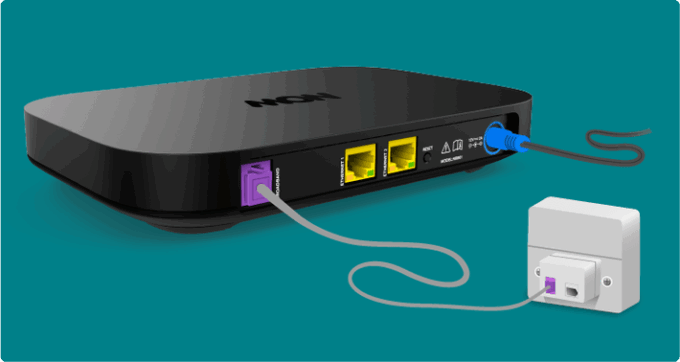
The solution isn’t always faster broadband—it’s the right router setup for your home’s size and layout. This guide explains your options, from upgrading your ISP router to installing a mesh WiFi system, with specific recommendations for UK homes.
When You Need More Than Your ISP Router
Signs Your Router Isn’t Cutting It
Dead Zones:
– No signal in certain rooms (bedrooms, kitchen, garden office)
– Connection drops when moving between floors
– Devices won’t stay connected in distant rooms
Slow Speeds Despite Fast Broadband:
– Speed test shows 300 Mbps near router, 20 Mbps upstairs
– Video buffering in some rooms but not others
– Smart home devices frequently offline
Connection Issues:
– 20+ devices competing for bandwidth
– Router needs frequent restarts
– Lag during video calls from home office
UK Home Size Guidelines
Small homes (<100m²): ISP router usually sufficient
Medium homes (100-150m²): Consider WiFi 6 router or single extender
Large homes (150-250m²): Mesh system (2-3 nodes) recommended
Very large homes (250m²+): Mesh system (3-4 nodes) essential
ISP Router vs Aftermarket: What’s Worth It?
Current UK ISP Routers (2026)
BT Smart Hub 2
– WiFi 5 (802.11ac)
– Dual-band (2.4GHz + 5GHz)
– Good for homes up to 120m²
– Handles 30-40 devices
– Free with BT broadband
Verdict: Solid for medium homes; struggles in large properties
Virgin Media Hub 5
– WiFi 6 (802.11ax)
– Dual-band
– Excellent multi-device handling
– Good for homes up to 140m²
– Free with Virgin Media
Verdict: Best ISP router; still limited range in large homes
Sky Hub
– WiFi 5
– Dual-band
– Basic performance
– Good for homes up to 100m²
– Free with Sky
Verdict: Adequate for small/medium homes only
EE Smart Hub Plus (2026)
– WiFi 7 (802.11be)
– Tri-band
– Latest standard, future-proof
– Good for homes up to 150m²
– Free with EE Full Fibre
Verdict: Most advanced ISP router; still range-limited
When to Upgrade
Keep ISP router if:
– Home under 120m²
– Good signal in all rooms
– Fewer than 20 devices
– No connection issues
Upgrade if:
– Dead zones in multiple rooms
– Multi-floor home with poor upstairs signal
– 30+ connected devices
– Work from home requiring reliability
– Gaming or streaming in distant rooms
Best Standalone Routers for Large UK Homes
Top Picks by Budget
#### Budget: Under £100
TP-Link Archer AX73 (WiFi 6)
– Price: £89.99
– Coverage: Up to 180m²
– Speed: AX5400 (5400 Mbps combined)
– Devices: 50+
– Pros: Excellent value, easy setup, good range, USB 3.0 port
– Cons: No WiFi 7, single unit (not mesh)
– Best for: Large single-floor homes, budget-conscious users
Asus RT-AX58U (WiFi 6)
– Price: £94.99
– Coverage: Up to 160m²
– Speed: AX3000 (3000 Mbps)
– Devices: 40+
– Pros: AiMesh compatible (expand later), good QoS
– Cons: Lower speeds than TP-Link
– Best for: Users who might add nodes later
#### Mid-Range: £100-£200
Asus RT-AX86U Pro (WiFi 6)
– Price: £179.99
– Coverage: Up to 200m²
– Speed: AX5700 (5700 Mbps)
– Devices: 70+
– Pros: Gaming features, 2.5G WAN port, excellent QoS, AiMesh
– Cons: Single unit, expensive for non-gamers
– Best for: Gamers, heavy users, work-from-home
Netgear Nighthawk AX8 (RAX80)
– Price: £169.99
– Coverage: Up to 190m²
– Speed: AX6000 (6000 Mbps)
– Devices: 60+
– Pros: Powerful, good range, USB ports
– Cons: Large size, no WiFi 7
– Best for: Power users, NAS setups
#### Premium: £200+
Asus ROG Rapture GT-AXE16000 (WiFi 6E)
– Price: £599.99
– Coverage: Up to 220m²
– Speed: AXE16000 (16000 Mbps)
– Devices: 100+
– Pros: 6GHz band, extreme performance, gaming features
– Cons: Overkill for most, very expensive
– Best for: Enthusiasts, professional streamers
TP-Link Archer BE900 (WiFi 7)
– Price: £549.99
– Coverage: Up to 210m²
– Speed: BE24000 (24000 Mbps theoretical)
– Devices: 100+
– Pros: Future-proof WiFi 7, tri-band, 10G port
– Cons: Very expensive, few WiFi 7 devices yet
– Best for: Future-proofing, early adopters
Mesh WiFi Systems: The Best Solution for Large Homes
Why Mesh Beats Traditional Routers
Advantages:
– Seamless roaming (one network name)
– Automatic device handoff between nodes
– Easy to expand (add more nodes)
– Self-optimizing (chooses best band/path)
– Whole-home coverage guaranteed
Disadvantages:
– More expensive than single router
– Slightly higher latency (usually unnoticeable)
– Requires multiple power outlets
– Can be overkill for small homes
Top Mesh Systems for UK Homes (2026)
#### Best Overall: TP-Link Deco X55 (3-pack)
Price: £179.99
Coverage: 560m² (3 units)
Speed: AX3000
WiFi Standard: WiFi 6
Devices: 150+
Features:
– Dead simple setup via app
– HomeShield security included
– Parental controls
– Works with any UK ISP
– Ethernet backhaul supported
Best for: Most UK households; excellent value
Setup:
Best Premium: Google Nest WiFi Pro (3-pack)
Price: £369.99
Coverage: 600m² (3 units)
Speed: AXE5400
WiFi Standard: WiFi 6E
Devices: 100+
Features:
– 6GHz band (less interference)
– Google Home integration
– Beautiful design
– Automatic updates
– Thread/Matter smart home support
Best for: Google ecosystem users, design-conscious
Cons: Expensive, fewer Ethernet ports
Best Budget: TP-Link Deco M4 (3-pack)
Price: £89.99
Coverage: 370m² (3 units)
Speed: AC1200
WiFi Standard: WiFi 5
Devices: 100+
Features:
– Very affordable
– Easy setup
– Parental controls
– QoS
Best for: Budget-conscious, basic needs
Cons: WiFi 5 (older), slower speeds
Best for Large Homes: Netgear Orbi WiFi 6 (RBK852)
Price: £449.99 (2-pack)
Coverage: 460m² (2 units)
Speed: AX6000
WiFi Standard: WiFi 6
Devices: 100+
Features:
– Dedicated 5GHz backhaul band (faster)
– Excellent range per node
– 4 Ethernet ports per unit
– Can add more satellites
Best for: Very large homes, users needing wired connections
Note: 3-pack (£599) covers 650m²
Best for Gaming: Asus ZenWiFi AX6600 (XT8)
Price: £379.99 (2-pack)
Coverage: 510m² (2 units)
Speed: AX6600
WiFi Standard: WiFi 6
Devices: 70+
Features:
– Gaming prioritization
– Adaptive QoS
– AiProtection security
– 2.5G WAN port
– Link aggregation
Best for: Gamers, streamers, power users
Best WiFi 7: Eero Max 7 (3-pack)
Price: £449.99
Coverage: 600m² (3 units)
Speed: BE133 (WiFi 7)
WiFi Standard: WiFi 7
Devices: 200+
Features:
– Latest WiFi 7 standard
– Amazon ecosystem integration
– Excellent app
– Auto-updates
– Built-in Zigbee (smart home)
Best for: Future-proofing, Amazon users
Note: Requires £10/mo Eero Plus subscription for advanced features
Placement Strategy for Maximum Coverage
Two-Story Home (150-200m²)
Node Placement:
Tips:
– Keep nodes elevated (shelf height)
– Avoid cupboards and corners
– Clear line of sight between nodes ideal
– Stagger vertically (not directly above/below)
Three-Story Home (200-300m²)
Node Placement:
Tips:
– Middle floor node reduces overall distance
– Basement/ground floor may need wired backhaul
– Concrete floors reduce signal penetration
Single-Story Large Home (200m²+)
Node Placement:
Tips:
– Think in thirds: divide home into sections
– External walls thicker (more signal loss)
– Conservatories/garden rooms often need dedicated node
Wired Backhaul: The Performance Boost
What is Backhaul?
Wireless Backhaul: Nodes communicate via WiFi (standard setup)
Wired Backhaul: Nodes connected via Ethernet cable (faster)
When Wired Backhaul Makes Sense
Ideal for:
– Ethernet cables already run in walls
– Newly built homes with structured cabling
– Powerline adapters connecting nodes
– Performance-critical applications (gaming, work)
Setup:
Performance Benefit:
– Wireless backhaul: 50% bandwidth overhead
– Wired backhaul: Full bandwidth available
– Example: 500 Mbps broadband → 250 Mbps wireless backhaul vs 500 Mbps wired
Powerline Backhaul Alternative
If running cables is impossible:
TP-Link AV2000 Powerline + WiFi Extender
– Uses electrical wiring as Ethernet
– £89.99 for kit
– 2000 Mbps theoretical (500-800 Mbps real)
– Good for Victorian/older homes
Limitations:
– Depends on electrical wiring quality
– Same circuit required
– RCD/fuse box can cause issues
ISP Compatibility and Setup
Using Mesh with UK ISPs
Plug and Play (Easy):
– Virgin Media: Hub to modem mode, connect mesh
– Most FTTP: ONT to mesh directly
– Sky: Hub to mesh works fine
– TalkTalk: Router to mesh, simple setup
Requires Settings (Medium):
– BT: May need PPPoE credentials
– EE: Sometimes needs manual configuration
– Vodafone: Occasionally needs VLAN tagging
Request from ISP:
– PPPoE username/password (BT, EE, Plusnet)
– VLAN ID if required (rare)
– Router admin password
Router Mode vs Bridge Mode
Router Mode (Recommended):
– ISP router stays active
– Mesh handles WiFi only
– Double NAT (minor gaming impact)
– Easiest setup
Bridge Mode (Advanced):
– ISP router becomes modem only
– Mesh handles everything
– Single NAT (better for gaming)
– Requires ISP settings
WiFi 6 vs WiFi 7: What Do You Need?
WiFi 6 (Current Standard)
Speed: Up to 9.6 Gbps theoretical
Best for: Most users in 2026
Devices: Widely supported (phones, laptops, tablets from 2020+)
Price: Affordable, mature technology
When WiFi 6 is Enough:
– Broadband under 1 Gbps
– Typical home use (streaming, browsing, video calls)
– 50-100 devices
– Budget under £400
WiFi 7 (Latest Standard)
Speed: Up to 46 Gbps theoretical
Best for: Future-proofing, early adopters
Devices: Limited support (2025+ flagship devices)
Price: Premium (£400+)
When WiFi 7 Makes Sense:
– Multi-gig broadband (2Gbps+)
– VR/AR applications
– 8K streaming
– 100+ devices
– Want 5-10 year investment
Real-World Benefit:
WiFi 7 excels at handling many devices simultaneously, not just raw speed. If you have 50+ smart home devices, security cameras, and multiple people working/gaming, WiFi 7’s MLO (Multi-Link Operation) helps.
Troubleshooting Poor Coverage
Problem: Still Have Dead Zones After Mesh
Solutions:
Problem: Slow Speeds Despite Strong Signal
Causes:
– Too many devices on one node
– ISP router bottleneck
– Old devices using WiFi 4 (slows entire network)
Solutions:
– Spread devices across nodes
– Upgrade ISP router to gigabit ports
– Disable 2.4GHz on newer devices (force 5GHz)
– Set device priority in mesh app
Problem: Devices Won’t Roam Between Nodes
Causes:
– Device “sticky” to original node
– Roaming settings too aggressive
Solutions:
– Toggle WiFi off/on on device
– Adjust roaming sensitivity in mesh app
– Forget network and reconnect
– Update device WiFi drivers
Cost Comparison: Router vs Mesh
| Solution | Upfront Cost | Coverage | Future-Proof | Best For |
|---|---|---|---|---|
| ISP Router | £0 (included) | 100-120m² | No | Small homes |
| TP-Link AX73 | £90 | 180m² | Medium | Budget single router |
| Asus RT-AX86U Pro | £180 | 200m² | Yes | Power users, gamers |
| TP-Link Deco M4 (3-pack) | £90 | 370m² | No | Budget mesh |
| TP-Link Deco X55 (3-pack) | £180 | 560m² | Yes | Best value mesh |
| Google Nest WiFi Pro (3-pack) | £370 | 600m² | Yes (WiFi 6E) | Premium, easy |
| Netgear Orbi AX6000 (2-pack) | £450 | 460m² | Yes | Very large homes |
Installation Tips for UK Homes
Victorian/Older Properties
Challenges:
– Very thick walls (60cm+ stone)
– Plaster over brick/lath
– Multiple small rooms
Solutions:
– More nodes (expect 1 per 100m² vs 200m² modern)
– Powerline adapters for backhaul
– Consider external node for garden buildings
– Position nodes away from external walls
New Builds
Challenges:
– Metal foil insulation (blocks signal)
– Thin walls = neighbor interference
Solutions:
– Often have Cat6 cabling – use wired backhaul
– Adjust channels to avoid neighbors
– WiFi 6E uses 6GHz (less congested)
Converted Lofts/Basements
Challenges:
– Concrete floors above/below
– Long distance from router
Solutions:
– Dedicated node essential
– Wired backhaul if possible
– Powerline adapters work well
– Consider separate SSID for these areas
Key Takeaways
Frequently Asked Questions
Q: Can I use my ISP router with a mesh system?
A: Yes. Keep ISP router for broadband connection, add mesh system for WiFi. Put ISP router WiFi in modem mode or just disable its WiFi and let mesh handle it.
Q: How many mesh nodes do I need?
A: General rule: 2-pack for 150-250m², 3-pack for 250-500m², 4+ nodes for 500m²+. Adjust for thick walls, multiple floors, or garden buildings.
Q: Will mesh WiFi work with Virgin Media Hub 5?
A: Yes, perfectly. Either put Hub 5 in modem mode or disable its WiFi and connect mesh to Hub 5 via Ethernet. Mesh system handles all WiFi.
Q: Is WiFi 7 worth it in 2026?
A: Only if you have multi-gig broadband (2Gbps+), 100+ devices, or want to future-proof for 5-10 years. WiFi 6 handles most needs excellently and costs half as much.
Q: Can I mix different mesh brands?
A: No. Mesh nodes must be same brand/system. However, many brands (Asus AiMesh, TP-Link OneMesh) let you mix different models within their ecosystem.
Q: Do I need tri-band mesh?
A: Helpful for 50+ devices or if you want dedicated backhaul band. Dual-band works fine for most homes. Tri-band makes sense for very large (300m²+) properties.
Q: Will mesh WiFi reduce my broadband speed?
A: Minimal impact with wired backhaul (0-5% loss). Wireless backhaul can reduce speeds 30-50% on distant nodes. Still better than weak signal from single router.
Last updated: January 2026. Product prices and specifications verified as of January 2026. Always check current pricing and ISP compatibility before purchasing.