The Ultimate Guide to the Best DNS Servers in the UK (2025)
 Julian Glover
Boost Your Broadband Speed | Reduce Gaming Lag | Stop Streaming Buffering
Last Updated: October 2025
What You’ll Learn in This Complete Guide
Instant Speed Boost , Switch DNS in 5 minutes for faster internet
Best Free DNS Servers , Top-rated options tested for UK users
Easy Setup Instructions , Step-by-step for BT, Sky, Virgin Media & more
Gaming & Streaming Optimization , Reduce lag and buffering
Troubleshooting Guide , Fix common DNS problems
Speed Testing Tools , Find your fastest DNS option
Quick Start: Best DNS for UK Users Right Now
Too busy to read everything? Start here:
| Provider | Primary DNS | Secondary DNS | Best For |
|---|---|---|---|
| Cloudflare | 1.1.1.1 | 1.0.0.1 | Fastest overall |
8.8.8.8 | 8.8.4.4 | Most reliable | |
| OpenDNS | 208.67.222.222 | 208.67.220.220 | Family safety |
Takes 5 minutes to setup
What is DNS? (Simple Explanation)
Think of DNS as the internet’s address book. When you type “bbc.co.uk,” your device asks a DNS server: “Where can I find the BBC?”
The Problem: Your ISP’s DNS is often slow and overloaded
The Solution: Switch to faster, free DNS servers for instant speed improvement
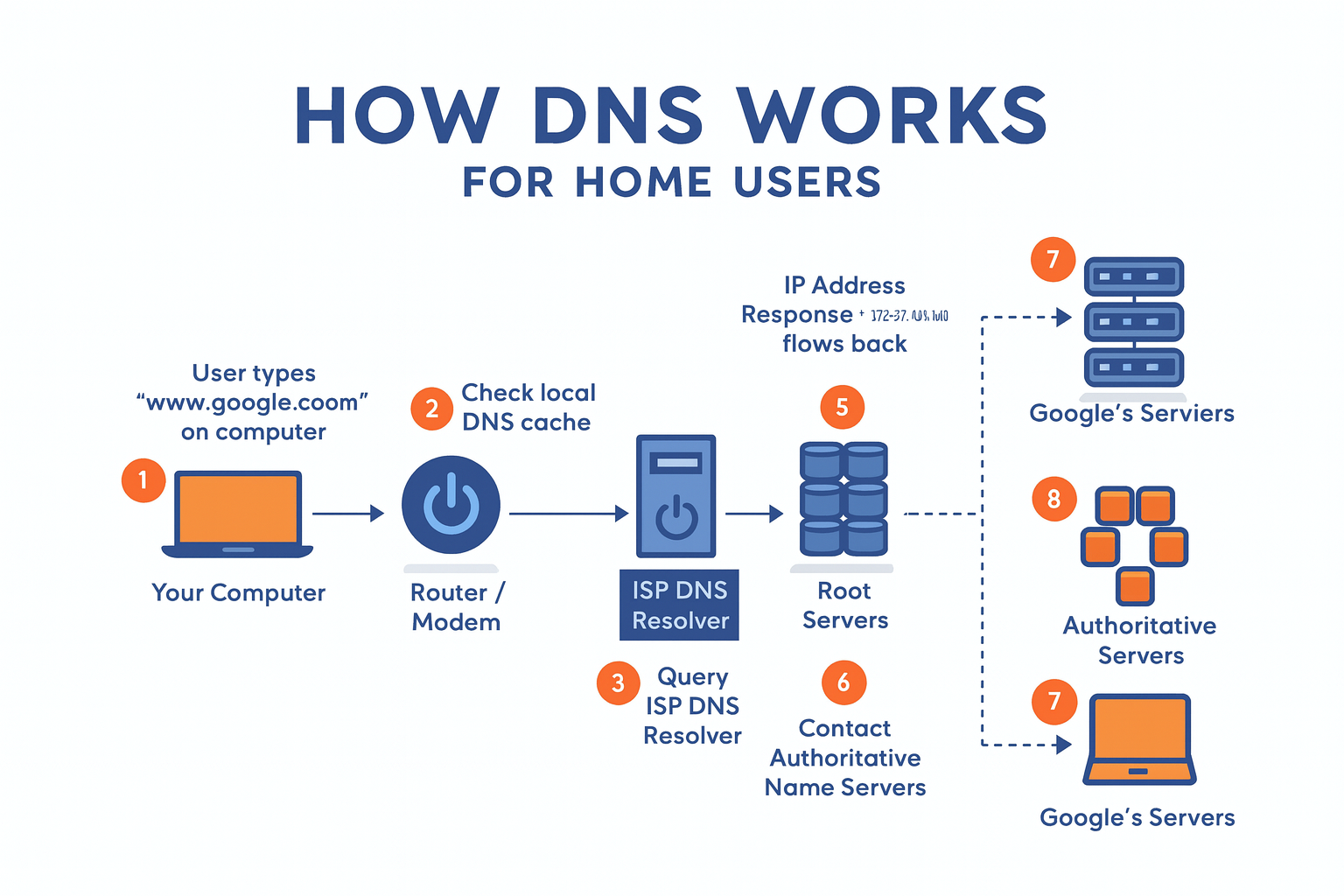
The Best DNS Servers for UK Broadband (2025)
1. Cloudflare DNS, The Speed Champion
Primary: 1.1.1.1 | Secondary: 1.0.0.1
Why UK users love it:
- Fastest response times (often under 10ms)
- Built-in security , blocks malware automatically
- Privacy focused , doesn’t log your browsing
- Global network , servers across the UK
Perfect for: Everyone, it’s the fastest DNS for most UK locations
2. Google Public DNS, The Reliable Choice
Primary: 8.8.8.8 | Secondary: 8.8.4.4
Why it’s trusted:
- Rock-solid uptime , rarely goes down
- Family-friendly , safe for all users
- Easy to remember , simple numbers
- Excellent coverage , works great across all UK regions
Perfect for: Families and users who want “set and forget” reliability
3. OpenDNS, The Family Guardian
Primary: 208.67.222.222 | Secondary: 208.67.220.220
Family features:
- Parental controls , block inappropriate content
- Customizable filtering , block specific websites
- Usage reports , see what sites are visited
- Malware protection , blocks dangerous sites
Perfect for: Parents wanting safe internet for children
4. Quad9, The Security Expert
Primary: 9.9.9.9 | Secondary: 149.112.112.112
Security benefits:
- Threat intelligence , blocks known bad sites
- Business-grade protection , enterprise security
- Privacy focused , Swiss-based, no logging
- Good speed , competitive performance
Perfect for: Security-conscious users and small businesses
Test Your DNS Speed (Before You Switch)
Don’t guess, test which DNS is fastest for YOU:
Recommended Testing Tools
- DNSPerf.com , Professional testing
- DNS Speed Test Online , Quick browser test
- Cloudflare Speed Test , Full analysis
How to Test Properly
- Test at different times , morning, afternoon, evening
- Run multiple tests , get average response times
- Note your location , results vary across the UK
- Test under load , while streaming or gaming
Pro Tip: The “fastest” can change based on your exact location in the UK!
Easy Setup Guide for All Major UK ISPs
BT Broadband Setup
Step-by-step:
- Open browser → go to
192.168.1.254 - Login with admin details (check router label)
- Advanced Settings → TCP/IP
- Select “Use These DNS Servers”
- Enter: Primary
1.1.1.1| Secondary1.0.0.1 - Click Apply → restart router
Current BT DNS: 62.6.40.178 (replace this)
Sky Broadband Setup
Quick setup:
- Browser →
192.168.0.1 - Login with Sky ID
- Network → DNS
- Turn OFF “Automatic DNS”
- Enter your chosen DNS servers
- Save → reboot router
Current Sky DNS: 90.207.238.97 (you’re upgrading from this)
Virgin Media Setup
Easy steps:
- Go to
192.168.0.1in browser - Enter password (on router label)
- Advanced Settings → Network → DNS
- Switch to “Manual”
- Input DNS addresses
- Apply → restart
Current Virgin DNS: 194.168.4.100 (time to upgrade!)
TalkTalk Setup
- Browse to
192.168.1.1 - Username:
admin| Password:admin - Internet → Broadband
- Choose “Use Static DNS”
- Enter new DNS servers
- Apply
EE/Plusnet Setup
- Router interface:
192.168.1.1 - Login with your credentials
- Network → WAN
- Set DNS to “Manual”
- Enter DNS addresses
- Save → restart
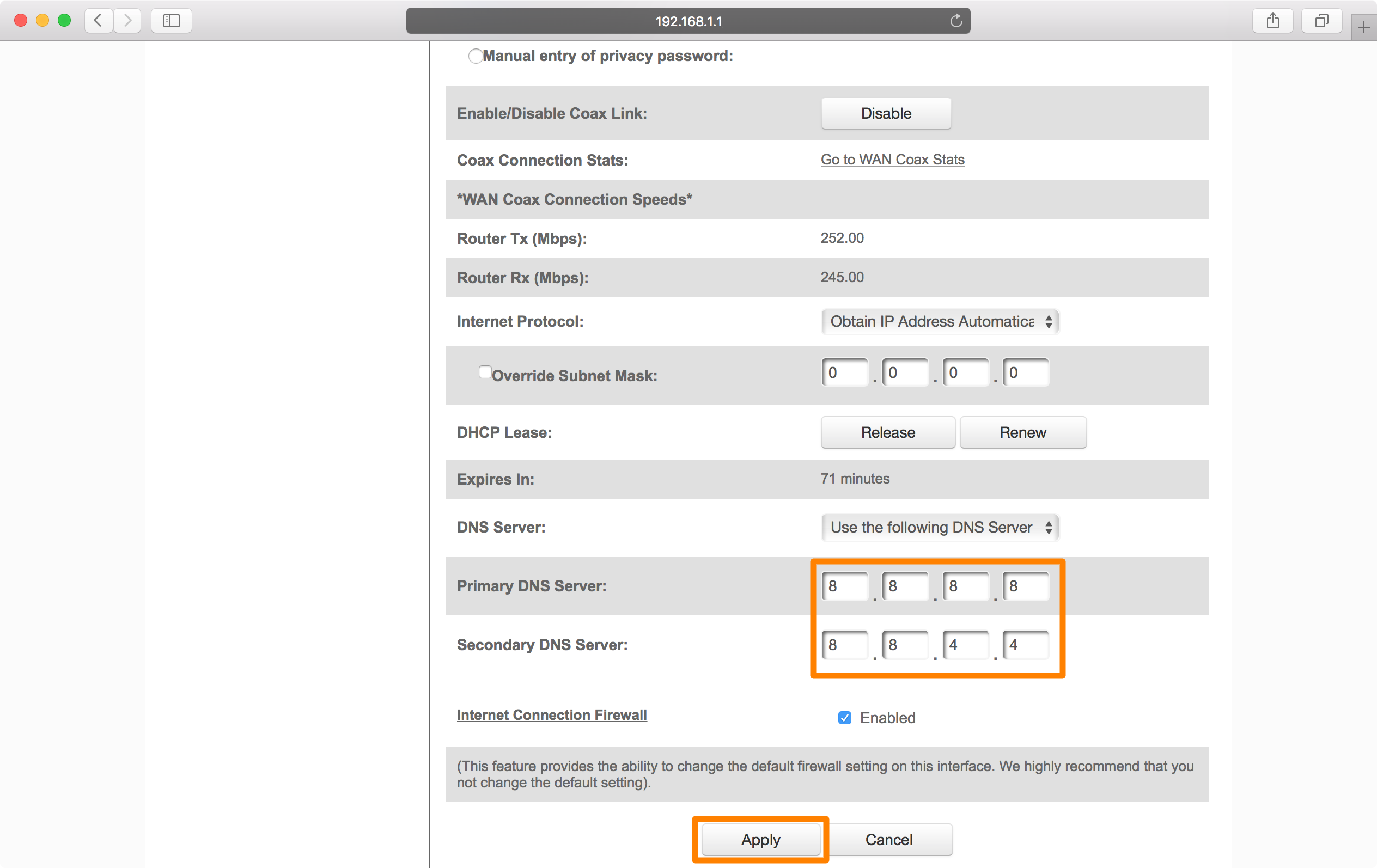 Image credit: iDownloadBlog, Typical router DNS setup screen
Gaming & Streaming Optimization
Best DNS for Gaming (Low Ping)
Top choices for UK gamers:
| DNS Provider | Average UK Ping | Best For |
|---|---|---|
| Cloudflare | 8-12ms | Competitive gaming |
| 10-15ms | Console gaming | |
| OpenDNS | 12-18ms | Casual gaming |
Gaming Setup Tips:
- Use Cloudflare for lowest latency
- Set DNS on your console directly for best results
- Test during peak gaming hours (7-11 PM)
Best DNS for Streaming
Optimize Netflix, BBC iPlayer, Amazon Prime:
Top streaming DNS:
- Cloudflare → Fast content delivery
- Google → Reliable 4K streaming
- Quad9 → Good performance + security
Smart TV Setup:
- TV Settings → Network
- Manual DNS Configuration
- Enter DNS servers
- Restart TV
Troubleshooting Common Problems
Slow Loading Websites
Symptoms you’ll notice:
- Pages take 10+ seconds to load
- Some sites work, others don’t
- Frequent timeouts
Quick fixes:
- Flush DNS cache: Press
Windows + R→ typecmd→ runipconfig /flushdns - Try Cloudflare DNS temporarily:
1.1.1.1and1.0.0.1 - Restart router (unplug 30 seconds)
- Test different DNS from our list above
“DNS Server Not Responding” Errors
When this happens:
- Browser shows connection errors
- Some apps work, others don’t
- Internet seems “partially broken”
Step-by-step fix:
- Test internet: Ping
8.8.8.8to check connection - Switch DNS immediately: Use
1.1.1.1as emergency DNS - Reset network: Run
netsh winsock resetin Command Prompt - Update network drivers in Device Manager
- Call ISP if problems continue
Gaming Lag & High Ping
DNS-related gaming issues:
- Sudden ping spikes
- Connection drops in online games
- Slow server connections
Gaming optimization:
- Use gaming DNS: Cloudflare
1.1.1.1 - Set on console: Don’t rely on router only
- Enable QoS: Prioritize gaming traffic
- Monitor during play: Use ping monitoring tools
Advanced Features & Security
Family-Safe DNS Options
For households with children:
CleanBrowsing Family Filter:
- Primary:
185.228.168.168 - Secondary:
185.228.169.168 - Blocks: Adult content, malware, ads
OpenDNS FamilyShield:
- Primary:
208.67.222.123 - Secondary:
208.67.220.123 - Features: Pre-configured family protection
Modern Security Features
DNS over HTTPS (DoH):
- Encrypts your DNS queries
- Prevents ISP snooping
- Available in Chrome, Firefox, Edge
DNS over TLS (DoT):
- Dedicated DNS encryption
- Better performance than DoH
- Supported by modern routers
UK-Specific Considerations (2025)
Regional Performance
London & Southeast: Best performance with all providers
Scotland & Northern Ireland: Test multiple options for best local performance
Rural Areas: Biggest improvements from switching away from ISP DNS
Post-Brexit DNS Market
Current status (2025):
- Cloudflare: Strong UK infrastructure maintained
- Google: Full UK service continues
- European providers: Some performance variations
- UK GDPR: All major providers compliant
Quick Action Checklist
Ready to improve your internet? Follow this:
- Test current speed , Use speed testing tools above
- Pick your DNS , Start with Cloudflare
1.1.1.1 - Set up on router , Follow your ISP guide above
- Test improvement , Compare before/after speeds
- Optimize devices , Set DNS on gaming consoles/smart TVs
- Share with family , Everyone benefits from faster DNS
Final Thoughts: Transform Your UK Broadband Today
Switching to the best DNS servers is the easiest way to boost your broadband performance, and it’s completely free! Whether you’re gaming, streaming, or just browsing, the right DNS can eliminate frustrating slowdowns.
Start here:
- Fastest overall: Cloudflare
1.1.1.1and1.0.0.1 - Most reliable: Google
8.8.8.8and8.8.4.4 - Family-safe: OpenDNS
208.67.222.222and208.67.220.220
Remember: Test which works best for YOUR location in the UK. What’s fastest in London might not be fastest in Glasgow!
Setup takes just 5 minutes, your faster internet is waiting!
This guide reflects the latest DNS recommendations for October 2025. Test regularly as performance can change over time.
Julian Glover
Julian Glover covers UK home and business broadband, comparing providers, explaining new tech, and helping readers find the right deal for their household.