The Openreach ONT box explained: models, ports and UK installation rules
 Julian Glover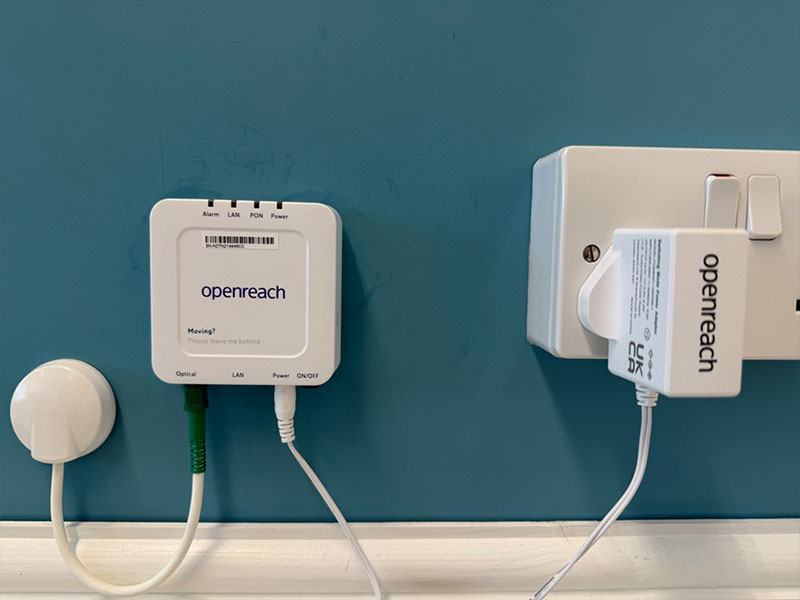
If you have Full Fibre broadband over the Openreach network, there is a small white box on a wall in your home doing quiet but essential work. It is the Optical Network Terminal, usually shortened to ONT and sometimes called an Openreach modem. Whichever provider you buy your broadband from, if the line is Openreach FTTP, this box is the point where the fibre optic cable ends and your own equipment begins.
This guide covers what the ONT is, the models Openreach uses across the UK, the ports on the front, the newer hardware being introduced, what happens on installation day, where the box can and cannot go, who owns it, and how you connect a router to it.
What is an Openreach ONT box?
The ONT is a white box that connects to the fibre optic cable running to your house and gives you access to the Openreach FTTP network for broadband and, for many people, voice calls. Its main job is simple: it takes the optical light signal arriving down the fibre and converts it into an electrical signal that your broadband router can use through an Ethernet port.
It is usually installed inside your home or office, hung on a wall, near the point where the fibre physically enters the building. It is not a router. It does not create Wi-Fi. It is the bridge between the network outside and the router inside.
Because the ONT belongs to Openreach rather than to any single provider, you will find the same kinds of boxes whether your broadband comes from BT, Sky, TalkTalk, Zen or another provider using Openreach fibre.
Openreach ONT models used in the UK
There is more than one design in the field. BT lists five different types of Openreach modem. They vary slightly in appearance, including the lights on the front, but they all do the same job of converting the optical signal for your router.
The models include:
- Huawei 1-port modem. A single-port unit that comes with a back-up battery pack (BBU) in a separate white box, which keeps your phone working during a power cut. The engineer fits it to your wall. A flap protects the cables and a front door opens so you can reach the ports.
- Huawei 4-port modem. As the name suggests, this one has four ports, though in practice most people only use PORT 1 to connect their router or hub.
- ECI modem.
- ECI C-Series modem.
- Nokia modem.
The standard ONT is usually a very small single-port device. Openreach also offers multi-port variants for people who need more than one connection.
Most of these boxes were designed to work with Openreach's existing GPON network (Gigabit Passive Optical Network). Newer models are being added to support the latest technology, covered further down.
Ports and connections on the ONT
The labelling is consistent across the range, so once you know what each port is for, you can find your way around any Openreach modem.
| Port | What it does |
|---|---|
| Optical | Hosts the fibre optic cable that runs from the exchange to your house |
| PORT 1 | Where you plug in the Ethernet cable that runs to your router or hub. Some modems have several of these |
| TEL 1 | Digital voice customers can plug a telephone in here |
| BBU | Connects to the battery back-up unit, where one is fitted |
| DC | Connects to the power supply, or to the BBU unit, depending on the model |
The key point for most households: the fibre goes into the Optical socket, and a single Ethernet cable runs out of PORT 1 to your router.
The new ONTs Openreach is rolling out
In June 2025 Openreach published an updated Suppliers Information Note (a technical document known as a SIN) summarising all its old, existing and future ONT modems. The updated SIN 506B lists newer models that will work alongside Openreach's latest XGS-PON technology and the current GPON network.
XGS-PON is a faster standard: the X stands for 10, the G for Gigabits and the S for Symmetric, meaning matched download and upload speeds. Openreach's XGS-PON trials are gearing up to support symmetric speeds of up to 3.3Gbps (3,300Mbps).
The document brings in two new suppliers, Zyxel and Sercomm, alongside familiar names such as Nokia and Adtran. Most of the kit listed supports speeds up to 1Gbps or 2.5Gbps, with faster units expected to follow. Two 10Gbps-capable models, the Nokia XS-010-X-Q and the Adtran SDX-631, were referenced early on, though an updated version of the SIN document later removed them because they are not yet formally launched. In other words, they are coming, but not quite here yet.
For context, Openreach's Full Fibre network currently reaches around 19 million premises and is expected to cover 25 million by December 2026, more than 80% of the UK, at a cost of up to £15bn. There is a longer-term ambition to reach up to 30 million by 2030.
How the ONT is installed: what to expect on the day
An Openreach engineer brings the fibre into your property and fits the ONT to a wall. The box needs to sit near the point where the fibre optic cable physically enters the building, because the fibre run inside the home is kept short.
The engineer connects the fibre to the Optical port, mounts the box, and connects it to power. If your service includes a battery back-up unit for voice, that gets fitted too. Once the ONT is up and running, the Ethernet cable from PORT 1 goes to your router, and your provider's broadband service can be activated.
Because a fibre installation involves physical cabling and a wall-mounted box, expect an appointment where someone will need access to the property. The engineer will decide the best route for the cable and the best spot for the box.
Where the ONT box can and cannot go
The main constraint is distance from the entry point. The ONT is designed to be hung on a wall close to where the fibre enters your home. That keeps the delicate fibre run short and tidy, which is why you cannot simply ask for it in a completely different room far from the entry point.
Within that limit, the engineer will look for a sensible location: somewhere the box can be mounted securely, reached for its ports, and connected to mains power. It also helps if it is reasonably close to where you want your router, since the two are joined by an Ethernet cable.
If you have a strong preference about where the box goes, raise it with the engineer at the start of the appointment. They make the final call based on where the fibre can safely and practically be brought in.
Who owns the ONT and what you are allowed to do with it
The ONT is Openreach equipment. It stays part of the Openreach network rather than becoming your property, although it lives in your home. That is why the same standard boxes appear across different providers: the network operator supplies and maintains the hardware, and your broadband provider sells you the service that runs over it.
In practice this means you should not remove, relocate or tamper with the box yourself. If it develops a fault or needs to be moved, that is a job for an engineer arranged through your provider. You are free to connect and disconnect your own router from PORT 1, which is the normal, expected thing to do.
Connecting your router to the ONT
This part is straightforward. Take an Ethernet cable and plug one end into PORT 1 on the ONT and the other end into the WAN or broadband socket on your router. On the four-port Huawei modem you will almost always use PORT 1 and can ignore the rest.
The ONT handles the fibre-to-Ethernet conversion, and the router takes it from there, managing your connection and broadcasting Wi-Fi around the home. If you are setting up a router supplied by your provider, it will be configured to work with this arrangement ready-made.
Troubleshooting ONT lights and common issues
The front of the ONT carries several lights, and they are your first clue to what is happening. When these lights change colour or flash, it means something is going on with the connection or the box itself. Because the exact lights differ between the Huawei, ECI, ECI C-Series and Nokia models, the safest reference is the light guide for your specific model, which your provider can point you to.
A few general pointers:
- No lights at all usually points to a power problem. Check the DC connection and, if fitted, the battery back-up unit.
- A steady optical or power light generally means the box has power and a fibre signal.
- A flashing or unusual coloured light can indicate the box is starting up, syncing, or reporting a fault.
If the lights suggest a fault you cannot clear with a router restart, contact your broadband provider. Since the ONT is Openreach property, they will arrange any repair or replacement.
FAQs
Is the ONT the same as my router? No. The ONT converts the fibre signal into Ethernet. The router then manages your connection and provides Wi-Fi. They are separate boxes joined by a single Ethernet cable.
Does the ONT need its own power? Yes. It connects to a power supply through its DC port, or draws power via the battery back-up unit where one is fitted. It will not work without power.
Do I need the ONT if I have Full Fibre? Yes. On an Openreach FTTP line the ONT is the termination point for the fibre. Without it there is nothing to convert the optical signal for your router.
Can I move the ONT to another room myself? No. It is Openreach equipment and needs to stay near where the fibre enters. Any move should be handled by an engineer arranged through your provider.
Why do different providers use the same box? Because the ONT belongs to Openreach, which runs the underlying network. Your provider sells the service; Openreach supplies and maintains the hardware.
Julian Glover
Julian Glover covers UK home and business broadband, comparing providers, explaining new tech, and helping readers find the right deal for their household.